
AI governance: you decide how far it goes
Updated
In short
AI governance is the set of rules by which a company decides who uses artificial intelligence, what for and with which data. rekiam handles it with four controls that are configured once: usage policies by organisation, department and person; lead approval; sensitive data protection (Spanish DNI, NIE and CIF numbers, IBANs, cards); and an independent compliance reviewer.
- PlatformGlobal security policies
- CorporateMandatory restrictions
- CompanyGeneral settings
- DepartmentMarketing
- ChatSEO expert
- UserPersonal preferences
“Put our top five customers' details in the blog post.”
Blocked at layer 02.
How do you control what the AI does in each department?
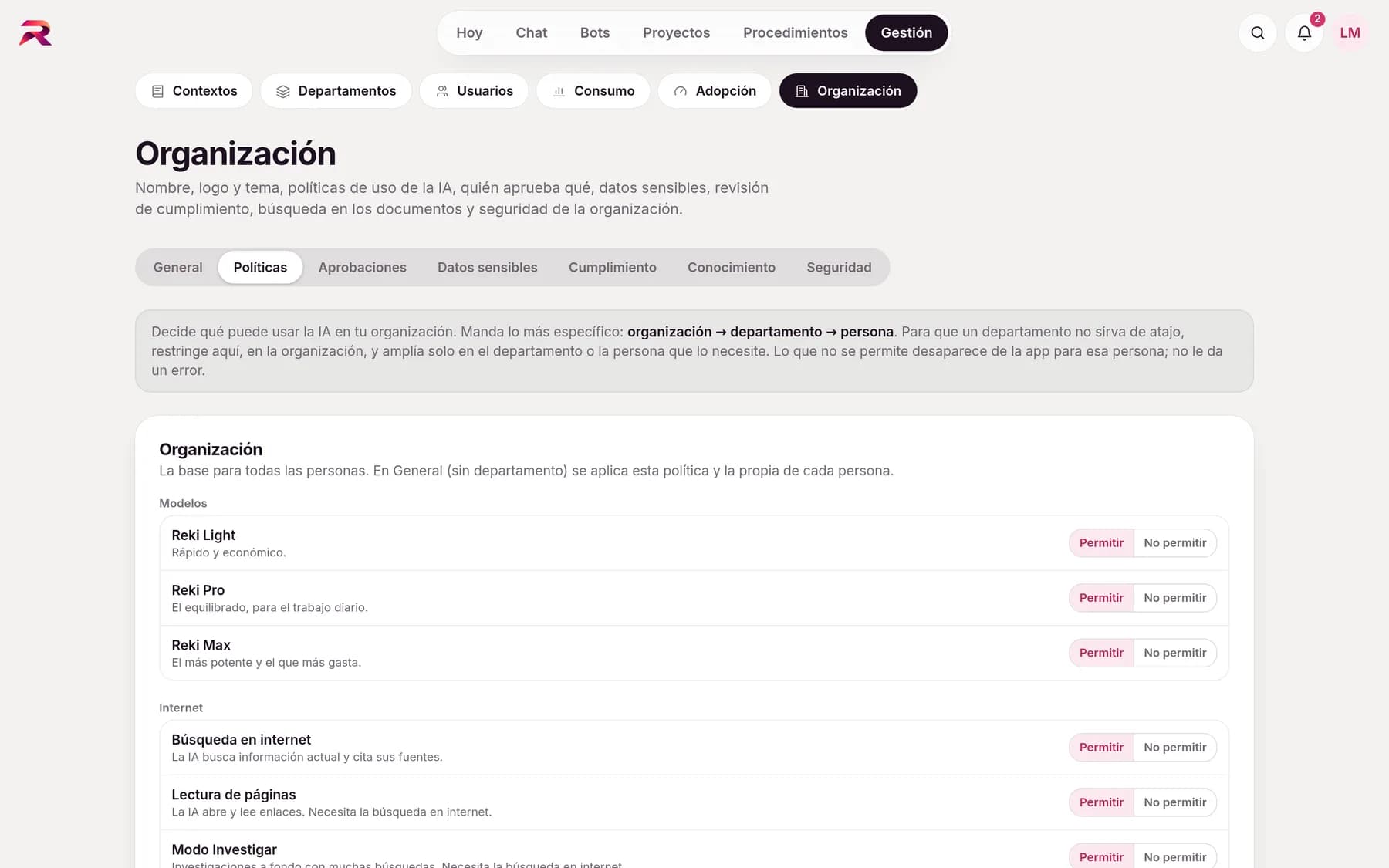
With usage policies: each department uses only what you allow. From Organisation › Policies you decide, setting by setting, what's allowed. There are three levels: organisation, department and person, and the most specific one wins. Everything is allowed by default, so switching rekiam on changes nothing until you decide it should.
- ModelsWhich AI levels can be used (Reki Light, Pro or Max). Reki Auto only chooses among the permitted ones.
- InternetWeb search, page reading and Research mode, each one separately.
- FilesCreating and editing files, the document canvas and interactive artifacts.
- Apps and connectorsEach connected app (Gmail, Drive, Outlook, Slack…) and each company connector, limited to the departments you choose.
- Memory, bots and sharingMemory, personal bots, chat sharing, background answers, parallel work, batches and voice dictation.
- What isn't allowed doesn't appearPeople never get an error after clicking: the button isn't there, or there's an explanation. Under “What I can use” everyone can check what they're allowed.
Nothing leaves the company without the right person's sign-off
Each person reviews what the AI prepares. On top of that, administrators set “what, where and who approves” rules. For example: if someone on probation writes to an address outside the company, that email is approved by their lead.
- Rules by type of action: emails to external recipients, Slack messages, sharing files, deleting, inviting external people or writing through a connector
- Also by condition: it contains sensitive data, a bot prepared it on its own or the reviewer didn't pass it
- The approver sees the action exactly as it will be carried out and the reason, never the conversation
- Approve, reject or request changes from Notifications, several at once if you like
- Nobody approves their own actions; a reminder after 24 hours, configurable expiry and delegation during holidays
How do you protect sensitive data when staff use AI?
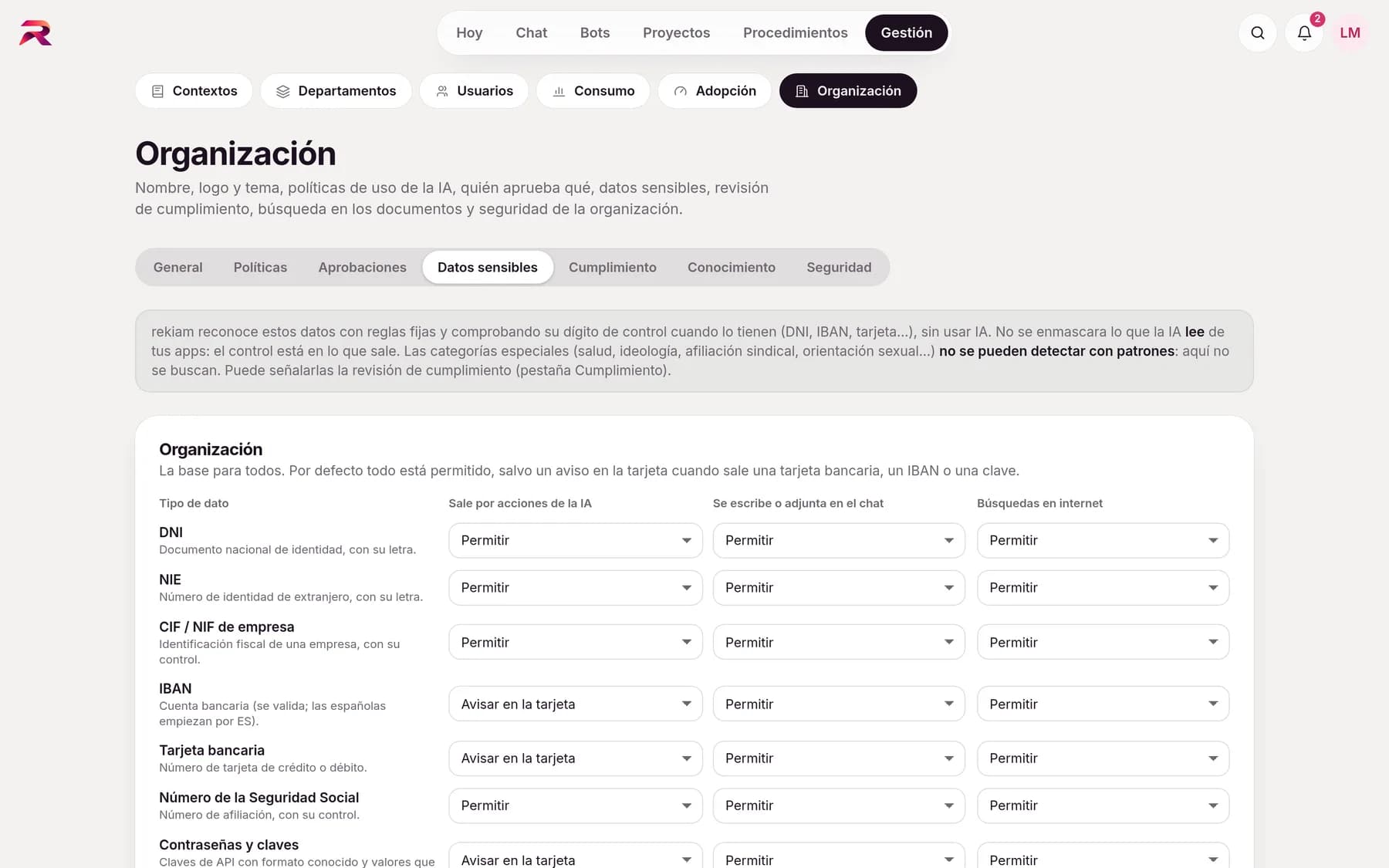
rekiam detects it and you choose whether to warn, mask or block it. It recognises DNI, NIE and CIF numbers (Spain's personal, foreigner and company tax IDs), IBANs, bank cards, Social Security numbers, phone numbers, emails and passwords or keys, verifying the check digit where there is one, as well as your company's confidential terms and custom patterns. For each type you choose what happens in each situation, with exceptions by department. Together with isolation between companies and SSO, it's what makes rekiam secure AI for business.
- When it goes out through an AI actionAllow, warn on the card, require the person's approval, require the lead's approval or block.
- When someone types it in the chatAllow, warn before sending, mask automatically (it reaches the AI as “[IBAN]” and the original isn't stored) or block.
- In web searchesAnswer without the internet when the message contains that data, so it doesn't end up in a query.
- Incident logEvery time a rule kicks in, it records who, when and what type of data, always masked.
A second reviewer checks everything against your rules
Before anything goes out, an AI reviewer, separate from the one that wrote it, checks it against your company's rules, prohibitions and procedures that apply in that space. It returns Compliant, Warnings or Non-compliant and, for each finding, the rule affected, the specific passage and a correction.
- Warn mode: shows the findings and lets you send anyway, with a record kept
- Enforce mode: with a breach it isn't sent; it's corrected or an exception is requested from the lead
- A “Review compliance” button on any answer, with “Fix” to redo it
- A dashboard with the rules that are breached most often, with no chat content
- If the reviewer fails, nothing is ever silently passed or left blocked with no way out
Before sending, everything is decided on a single card
Whatever the AI is about to do outside the chat (send, share, write in a document or use a connector) appears on a single card with its checks: the reviewer's result, the sensitive data it contains and who else has to approve it. The button says what applies: Send, Send anyway, Send for approval, or why it's blocked.
The AI prepares
It drafts the email, the message or the change and leaves it as a draft.rekiam checks
Usage policy, sensitive data and compliance, in seconds.The person decides
They review, edit if they wish and send it or submit it for approval.The lead approves
Only when a rule requires it, and without seeing the conversation.
You know exactly what instructions the AI receives
Governance starts with what the AI knows. In Contexts each level has its version history, a view of what it inherits and a diagnostic that flags rules that contradict each other. And what the AI learns in chats only enters the context if whoever manages that level approves it.
- Instruction diagnostic with suggestions
- Version history for each context
- Context proposals with approval
- Exportable activity log: who changed what and when
Frequently asked questions about AI governance
What is AI governance in a company?
It's the set of rules, permissions and controls by which a company decides who uses artificial intelligence, for which tasks, with which data and under what oversight. In rekiam it takes the form of usage policies by level, lead approval, sensitive data protection, compliance review and an activity log.
How do I stop my team pasting customer data into the AI?
In rekiam you choose what happens when someone types a DNI, an IBAN, a card number or other sensitive data: warn before sending, mask it automatically so the AI only receives “[IBAN]” and the original isn't stored, or block the message. It's configured per organisation, with exceptions by department.
Can a lead approve what the AI sends on behalf of their team?
Yes. Administrators create rules stating which actions need approval from the department lead, an administrator or specific people. The approver sees the action and the reason, never the conversation, and can approve, reject or request changes.
Does rekiam detect special categories of data, such as health or trade union membership?
The sensitive data detectors work with patterns (DNI, IBAN, cards…) and can't recognise special categories. That's what the compliance review is for: you can have the AI reviewer flag them as a warning before sending.
Does the compliance review replace human review?
No. The reviewer is an AI and it's one more control: it adds to the person's own review, the lead rules and sensitive data protection. And rekiam never sends on its own anything the reviewer has marked as a breach.
Can I limit which models or features each department uses?
Yes. Usage policies are set for the organisation, and each department or person can inherit, extend or restrict them: models, web search, file creation, connected apps, memory, personal bots and more. And spending is kept in check with limits per department under AI adoption and spending.
Your company already has its own standards. Make the AI follow them.
Tell us how your team works and we'll show you rekiam with examples from your day-to-day: your departments, your documents and your policies. The first call is free.
Already a customer? Log in to rekiam