
An AI assistant for business that doesn't just answer: it works
Updated

What does an AI assistant for business do?
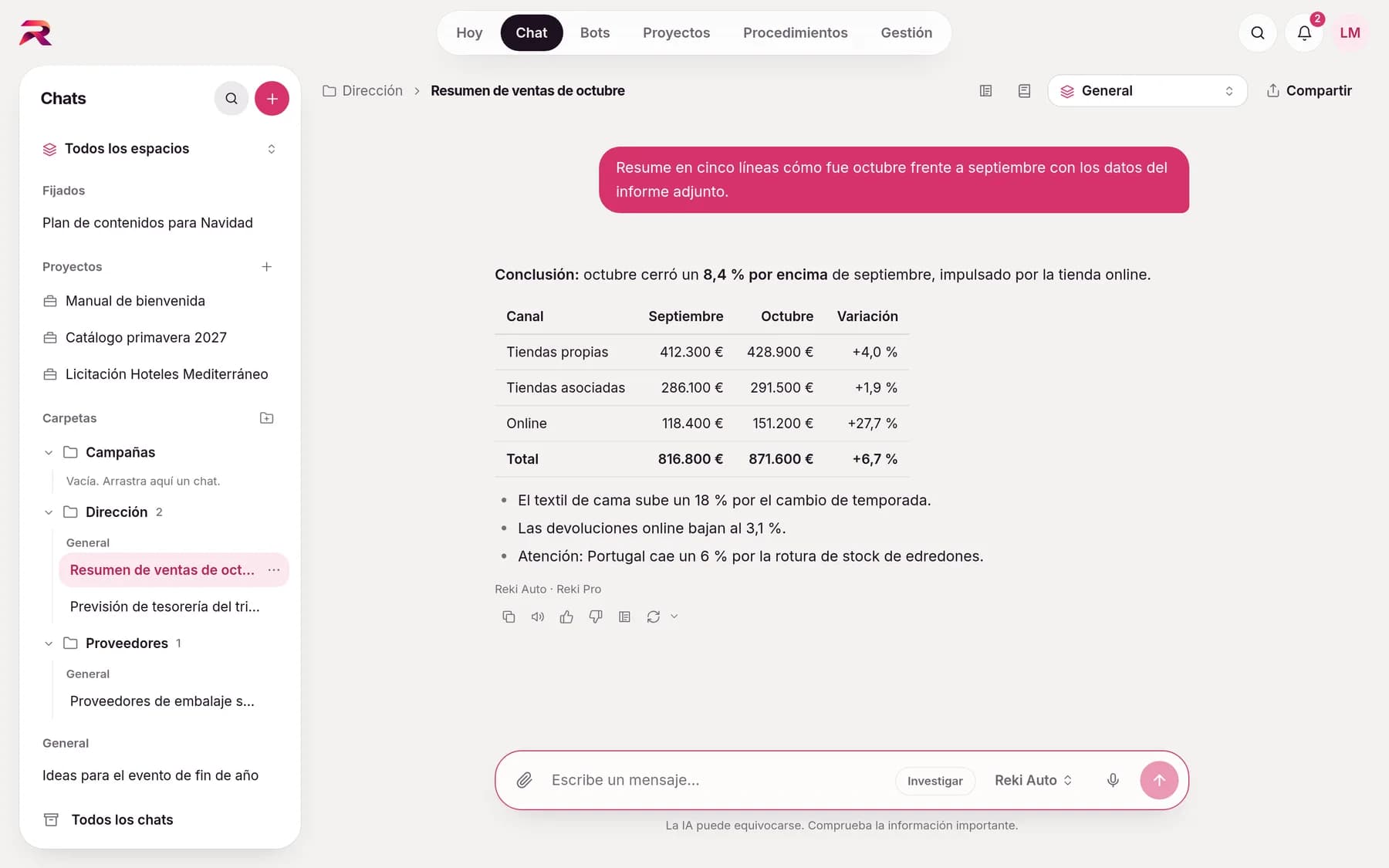
It answers, writes and researches in a chat as easy as the AI assistants you already know. The difference is that every answer starts from what it knows about your company.
- Real-time answersText appears as it's written, with formatting, tables and lists. If something fails, retry with one click.
- Folders and pinned chatsOrganise your conversations into folders, pin the important ones, archive them or manage several at once.
- WorkspacesEach chat belongs to General, a department or a section, and only uses that context.
- Edit, regenerate and rateCopy any message, edit yours and resend it, regenerate the answer with another model or rate it.
- Search all your chatsFind any conversation by its title or by what was said, regardless of accents or capitals.
- Long conversationsWhen a chat grows very long, the AI automatically summarises older parts so it keeps the thread.

Teamwork, without copy-pasting
Gather everything a topic needs in a project and share the conversation with whoever needs to see it.
- ProjectsFixed instructions and documents per topic (tenders, contracts, payroll…) that the AI uses in every chat of the project.
- Scope to fitPersonal projects, or for a section, a department or the whole company, with each level's permissions.
- Share a chatInvite colleagues to read or write in a conversation. Each message shows who wrote it.
- Secure by designIn a shared chat the AI doesn't use anyone's personal context, memory or apps, so nobody can access someone else's data.

It hands you files, not just text
Reports, spreadsheets and presentations ready to use: you review them in a preview panel and download them instantly.
- Word, Excel and PowerPointReports, contracts, quotes, sheets with formulas, pivot tables and charts, and sales presentations.
- PDF, CSV, JSON and moreAlso PDF, CSV, JSON, XML, Markdown, charts and images.
- Convert and compareWord to PDF, CSV to Excel, compare versions, merge or split documents and extract data from invoices or contracts.
- From your templatesAttach your template and the AI fills it in with company data, flagging what's missing instead of making it up.

Edit the document alongside the AI, without leaving the chat
When you ask for a text to review, such as a report, a proposal or a long email, the AI writes it on a canvas that opens next to the chat. You tweak it by hand and the AI sees your changes.
- Select and askHighlight a paragraph and choose Improve, Shorten, Lengthen, Fix, Change tone or Translate. The AI changes only that part.
- Changes in viewWhat the AI adds is highlighted and what it removes is struck through, until you mark it as seen.
- VersionsEach round of changes is saved with its author: compare with the previous one or restore any of them.
- Get the result outExport to Word or PDF with the corporate template, send it by email, save it to Drive or OneDrive, or turn it into a template.
- Interactive artifactsCalculators, dashboards, diagrams or prototypes that the AI codes and that run in isolation, with no access to the internet or your data.
- Open in its own appThe Word, Excel and PowerPoint files the AI creates open in Google Docs, Sheets and Slides or in Office online, so you can edit them with all their formatting.

Give it your files and it works with them
Attach files with the paperclip, by dragging or pasting them, and the AI keeps them in mind throughout the conversation.
- Up to 10 files per messagePDF, Word, Excel, PowerPoint, CSV, TXT, Markdown and PNG, JPG, GIF and WEBP images.
- Built-in previewOpen attachments and created files in a side panel with zoom, Excel sheets and slides.
- Knowledge at scaleUpload as much documentation as you like: the AI searches and reads what it needs at each moment and cites the document.
- Personal and privateAttachments are yours, like the chat: nobody else in your organisation can see them.

Up-to-date information, with the source in view
When the answer depends on something current (regulations, prices, news), the AI searches the web and cites each source next to the text.
- Verifiable citationsEvery fact has its source next to it and, below the answer, the full list of pages consulted.
- Research modeThe AI plans, searches many sources, reads full pages, cross-checks and delivers a report with citations.
- Reads any pagePaste the address of a website or a PDF and the AI reads it in full to work with it.
- No data leaksIt's instructed not to include your company's confidential information in searches.

Start the job and get on with yours
Research and large jobs keep going even if you close the window, and you're notified when they finish.
- In the backgroundStart a piece of research, get on with your work and receive a notification when it's ready. You can see what it's doing and cancel it.
- Parallel workTo compare suppliers or analyse several documents, the AI splits the work into up to 5 parts that run at the same time and then brings the results together.
- Document batchesHundreds of invoices, contracts or CVs with a single instruction, and the result in an Excel table.
- Answers that don't get lostIf the tab closes or the connection drops halfway through an answer, the server finishes it and lets you know.

Dictate it, listen to it and carry it in your pocket
rekiam installs as an app on your phone or computer, and you can talk to it instead of typing.
- DictationThe microphone writes what you say live. It never sends on its own: you review and send. rekiam doesn't receive or store the audio.
- Read aloudAny answer from the AI can be listened to with one click.
- Installable appIts own icon, full screen and shortcuts, without storing chats or company data on the device.
- Push notificationsYou find out with the app closed, with a “do not disturb” window and no content in the notification.

Memory: the more you use it, the better it knows you
The AI learns about each person (what they do, how they like answers, their projects and clients) and remembers it in later conversations.
- Tells you when it savesWhen it remembers something it says so in the message (“Saved to memory”).
- Truly privateOnly you can see it: not administrators, not the rekiam team. You can forget memories, clear it or turn it off.
- Memory per botEach Reki Bot has its own memory of you, so it gets better with use.
- Write it and correct itAdd by hand what the AI should know about you and correct any memory by clicking on its text.
- Team memoryWhat a shared bot learns for its whole team is proposed by the bot and approved by whoever manages it.
- Team things go to contextWhat should apply to a team doesn't go to memory: it's proposed to the context and confirmed by a lead.
You have the final say
Sending emails or messages, inviting to meetings, sharing or deleting doesn't happen instantly: the AI leaves it as a draft with a card to Send, Edit or Cancel. For multi-step tasks it leaves a checkpoint with Continue or Cancel and carries on once you give the go-ahead.
- Pending queue in Notifications, also for what bots prepare
- Review is only skipped in the apps where you explicitly allow it
- If the conversation contains third-party content (emails, websites, documents), writes also wait for your approval
- The card shows the checks: compliance, sensitive data and whether a lead has to approve it
Your working day and your processes, in order
Each piece, from the inside
- Reki Auto picks the right model for every messageChoose Reki Light, Pro or Max, or let Reki Auto assess each message and send it to the model it needs: fast for simple things, the most capable for complex ones.
- IntegrationsConnect Google Workspace, Microsoft 365 and Slack, or your company's systems through MCP connectors, and the AI reads, drafts and sends emails, creates and organises files, schedules meetings and queries your CRM on your behalf.
You decide who sees what and how much is spent
- Clear rolesOwner, Administrator and Member, plus a Lead per department.
- Departments and sectionsBuild your company's structure and decide who joins each part and who can use general chats.
- UsersAdd people with email and password, with Google, with your company's SSO or automatically via SCIM.
- Spending in eurosMonthly spend, forecast, breakdown by person, department, bot and model, and charts of when it's used.
- Spending limitsMonthly limits for the organisation, each department, each shared bot and each person, with alerts at 80% and 100%.
- Adoption and time savedWho uses AI, what for, and an estimate of the time it saves, anonymised by default.
- Usage policiesWhich models, apps and features each department and each person can use.
- Sensitive data and complianceDNI, IBAN or card numbers kept in check, and an independent reviewer working from your rules.
What we're working on
- Meaning-based search across your documents
- Bots inside Slack, Teams and email
- Bots that run procedures
- Spreadsheet canvas
- SAML and SCIM groups
Your company already has its own standards. Make the AI follow them.
Tell us how your team works and we'll show you rekiam with examples from your day-to-day: your departments, your documents and your policies. The first call is free.
Already a customer? Log in to rekiam