
Automate processes with AI, always the way your company does them
Updated
In short
A runnable procedure in rekiam is a company process (a quote, onboarding a supplier, a contract review) turned into a form and a list of steps. The AI follows them in order, without skipping any, stops at the checkpoints and checks the defined criteria at the end. Batches apply the same instruction to up to 200 documents and return a table in Excel.
- Input form
- Steps in order
- Checkpoints
- Steps for the person
- Evidence
- Verification criteria
How do you automate processes with AI without losing control?
With procedures: the AI follows your steps in order and stops at the checkpoints you mark for your OK. Each procedure has its profile, its input data, its steps and its verification criteria. Only published ones can be launched, and every change creates a version. It's the foundation of AI for operations: what the team knows, turned into processes that get followed.
- Input formUp to 30 fields: text, number, amount, date, lists, files or a person in the organisation, with help text and default values.
- Steps in orderUp to 30 steps with instructions for the AI. The AI can't skip any of them or mark the procedure as finished without assessing the criteria.
- CheckpointsAt the steps you mark, the AI stops and waits for your OK before carrying on.
- Steps for the personSome things are done by someone, not by the AI: it explains what to do and waits for you to mark it as done.
- EvidenceAt the steps that require it, the AI records what it did and where it ended up.
- Verification criteriaAt the end, the result is checked against what the company expects and, if it falls short, whoever manages it is notified.
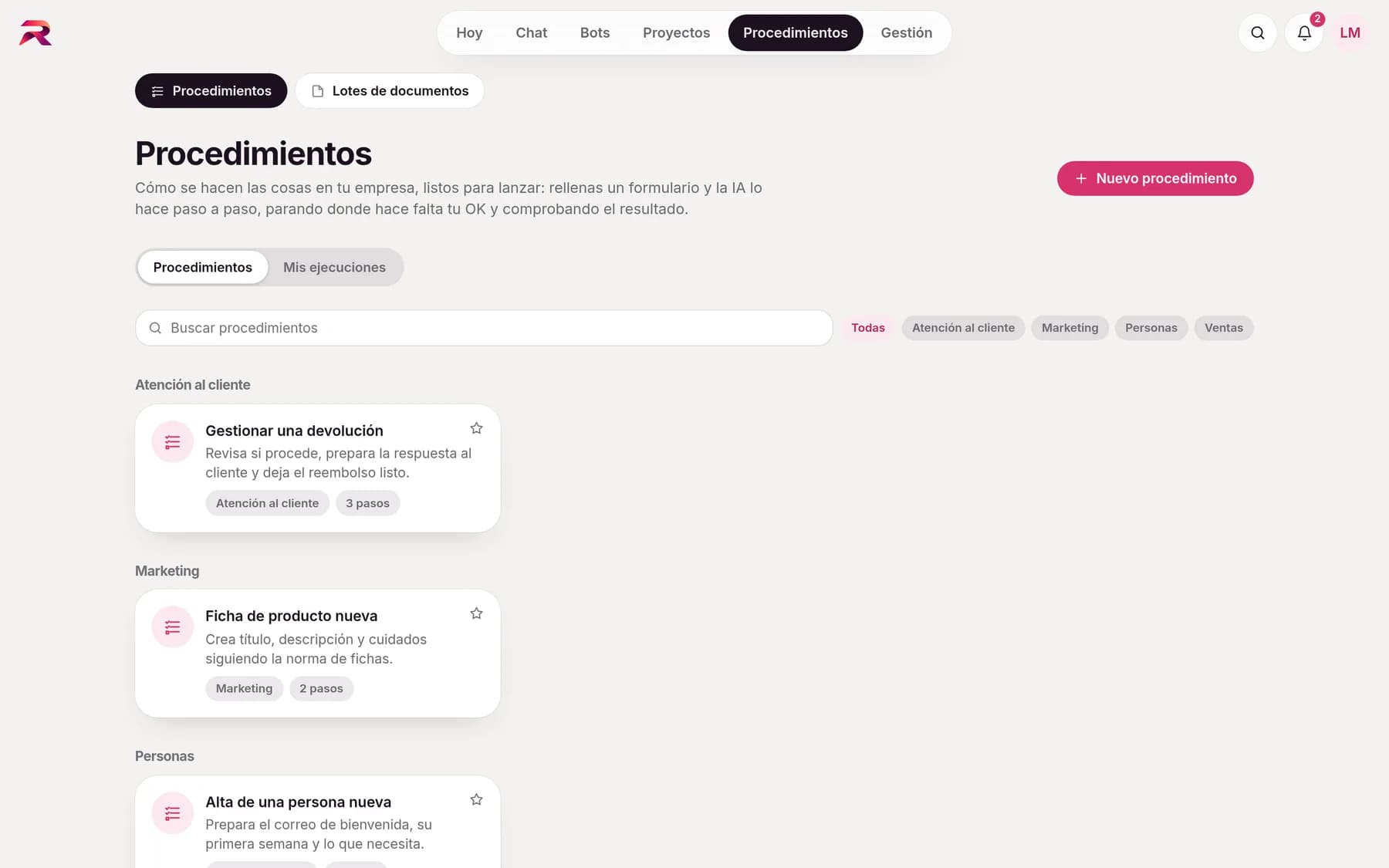
Tell it how it's done and the AI writes it up
The editor lets you add, reorder and duplicate fields and steps, with a preview of the form. So you don't have to start from a blank page:
- Draft with AI: you explain the process or paste a text and it proposes fields, steps, checkpoints and criteria
- Make runnable a procedure you've already written in Contexts
- 10 templates by area: quote, complaint, supplier onboarding, monthly report, minutes, staff onboarding, contract review, invoice, job advert and social media
- Personal scope, or for a section, a department or the whole company
Launch it from the chat and follow its progress
Under Runs, whoever manages the procedure sees who launched it, when, how long it took, which steps were skipped and which criteria weren't met, as well as where it's abandoned most often. They never see the conversation. And anything that should happen on its own, at a set time or when an email arrives, hand it to an AI agent.
Launch
From the gallery, from the shortcuts in a new chat or by typing “/” in the message box.Fill in
The form validates each field and warns you beforehand if an app or a template still needs connecting.Work with the AI
A normal chat opens with a progress panel: steps, evidence and pending checkpoints.Check
At the end the criteria are assessed and you can launch it again with the same data.
Documents come out with the house design
Upload your Word, Excel, PowerPoint, Markdown or CSV templates to Contexts › Templates and say when each one should be used. When someone asks for a document of that kind, or a procedure step calls for it, the AI loads the template and fills it in while keeping the design, flagging what's missing instead of making it up.
- Templates by level, inherited downwards
- A Template button in the message box to choose one
- Turn any canvas into a template
How do you extract data from hundreds of invoices with AI?
With a document batch: one instruction for all the files. Upload lots of files (PDFs, including scanned ones, Word, Excel, PowerPoint, text or images), write the instruction and, if you like, the fields to extract. rekiam processes them in the background and notifies you when it's done with a table: one row per file, ready to download as Excel or CSV.
- Custom fieldsDefine each field with its name and type (text, number, date, yes/no) and a hint for the AI.
- Estimated cost before launchingYou see the cost estimate and, if it doesn't fit within your limit, your department's or the organisation's, it doesn't launch.
- Clear statusesOK, Review, Error with its reason, Skipped or Cancelled, with “Retry failed”.
- Up to 200 files200 files and 60 MB per batch. Batches are personal: nobody else sees them.
Carry on working while the AI finishes
Research and large jobs don't force you to wait in front of the screen.
- Background answers: you close the window and it notifies you when the research is ready
- Parallel work: the AI splits a large job into up to 5 parts that run at the same time and then brings the results together
- The parallel parts can only read: they never send or change anything
- Everything counts towards your spending limits and respects your organisation's policies
Frequently asked questions about procedures and batches
How do you automate a business process with AI?
In rekiam the process is described as a procedure: the data required, the steps in order, where the AI must stop to ask for sign-off and which criteria the result must meet. Each person launches it from a form and the AI carries it out with them in a chat, leaving evidence of each step.
Can AI extract the data from hundreds of invoices into an Excel file?
Yes. With document batches you upload up to 200 files, specify the fields (supplier, date, taxable amount, total…) and rekiam returns a table with one row per invoice, downloadable as Excel or CSV. It also works with scanned PDFs and images.
Can the AI skip a step in the procedure?
No. The AI can't skip steps or mark the procedure as finished without assessing all the criteria. If something prevents it from completing a step, it marks it as blocked and asks. Only the person can skip a step, and only if the procedure allows it and they give a reason.
Who sees the data from a run?
Whoever manages the procedure sees the form data, the progress of the steps, the evidence and the criteria, but never the conversation. The form says so before you submit it.
Can it fill in my company's Word and Excel templates?
Yes. Templates are uploaded by level (company, department, section) with a note on when to use them. The AI fills them in while keeping the design and flags missing data instead of making it up.
Your company already has its own standards. Make the AI follow them.
Tell us how your team works and we'll show you rekiam with examples from your day-to-day: your departments, your documents and your policies. The first call is free.
Already a customer? Log in to rekiam